# GPT Crawler
Crawl a site to generate knowledge files to create your own custom GPT from one or multiple URLs
- [Example](#example)
- [Get started](#get-started)
- [Running locally](#running-locally)
- [Clone the repository](#clone-the-repository)
- [Install dependencies](#install-dependencies)
- [Configure the crawler](#configure-the-crawler)
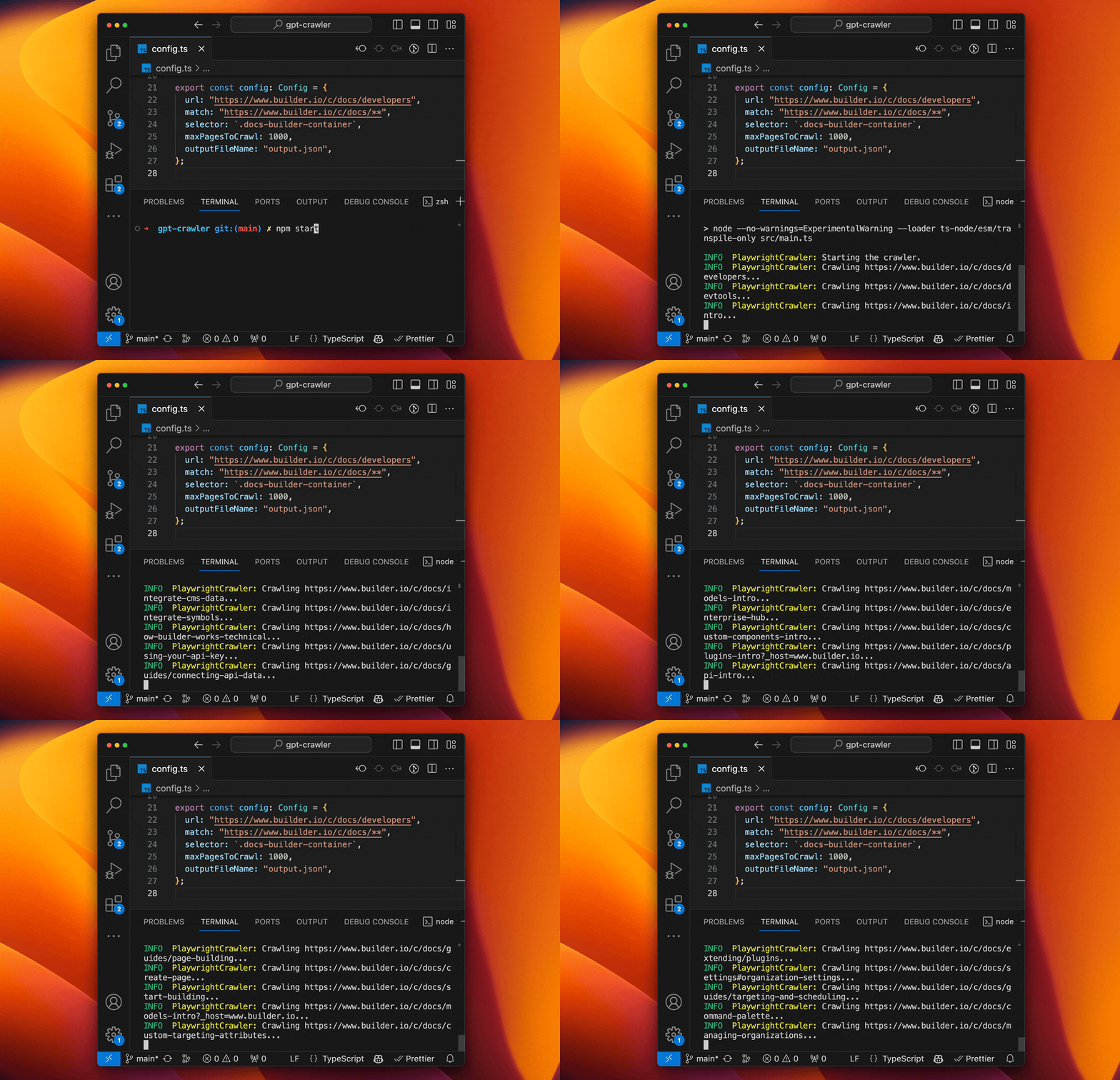
- [Run your crawler](#run-your-crawler)
- [Alternative methods](#alternative-methods)
- [Running in a container with Docker](#running-in-a-container-with-docker)
- [Running as a CLI](#running-as-a-cli)
- [Development](#development)
- [Upload your data to OpenAI](#upload-your-data-to-openai)
- [Create a custom GPT](#create-a-custom-gpt)
- [Create a custom assistant](#create-a-custom-assistant)
- [Contributing](#contributing)
## Example
[Here is a custom GPT](https://chat.openai.com/g/g-kywiqipmR-builder-io-assistant) that I quickly made to help answer questions about how to use and integrate [Builder.io](https://www.builder.io) by simply providing the URL to the Builder docs.
This project crawled the docs and generated the file that I uploaded as the basis for the custom GPT.
[Try it out yourself](https://chat.openai.com/g/g-kywiqipmR-builder-io-assistant) by asking questions about how to integrate Builder.io into a site.
> Note that you may need a paid ChatGPT plan to access this feature
## Get started
### Running locally
#### Clone the repository
Be sure you have Node.js >= 16 installed.
```sh
git clone https://github.com/builderio/gpt-crawler
```
#### Install dependencies
```sh
npm i
```
#### Configure the crawler
Open [config.ts](config.ts) and edit the `url` and `selectors` properties to match your needs.
E.g. to crawl the Builder.io docs to make our custom GPT you can use:
```ts
export const defaultConfig: Config = {
url: "https://www.builder.io/c/docs/developers",
match: "https://www.builder.io/c/docs/**",
selector: `.docs-builder-container`,
maxPagesToCrawl: 50,
outputFileName: "output.json",
};
```
See [config.ts](src/config.ts) for all available options. Here is a sample of the common configu options:
```ts
type Config = {
/** URL to start the crawl, if sitemap is provided then it will be used instead and download all pages in the sitemap */
url: string;
/** Pattern to match against for links on a page to subsequently crawl */
match: string;
/** Selector to grab the inner text from */
selector: string;
/** Don't crawl more than this many pages */
maxPagesToCrawl: number;
/** File name for the finished data */
outputFileName: string;
/** Optional resources to exclude
*
* @example
* ['png','jpg','jpeg','gif','svg','css','js','ico','woff','woff2','ttf','eot','otf','mp4','mp3','webm','ogg','wav','flac','aac','zip','tar','gz','rar','7z','exe','dmg','apk','csv','xls','xlsx','doc','docx','pdf','epub','iso','dmg','bin','ppt','pptx','odt','avi','mkv','xml','json','yml','yaml','rss','atom','swf','txt','dart','webp','bmp','tif','psd','ai','indd','eps','ps','zipx','srt','wasm','m4v','m4a','webp','weba','m4b','opus','ogv','ogm','oga','spx','ogx','flv','3gp','3g2','jxr','wdp','jng','hief','avif','apng','avifs','heif','heic','cur','ico','ani','jp2','jpm','jpx','mj2','wmv','wma','aac','tif','tiff','mpg','mpeg','mov','avi','wmv','flv','swf','mkv','m4v','m4p','m4b','m4r','m4a','mp3','wav','wma','ogg','oga','webm','3gp','3g2','flac','spx','amr','mid','midi','mka','dts','ac3','eac3','weba','m3u','m3u8','ts','wpl','pls','vob','ifo','bup','svcd','drc','dsm','dsv','dsa','dss','vivo','ivf','dvd','fli','flc','flic','flic','mng','asf','m2v','asx','ram','ra','rm','rpm','roq','smi','smil','wmf','wmz','wmd','wvx','wmx','movie','wri','ins','isp','acsm','djvu','fb2','xps','oxps','ps','eps','ai','prn','svg','dwg','dxf','ttf','fnt','fon','otf','cab']
*/
resourceExclusions?: string[];
};
```
#### Run your crawler
```sh
npm start
```
### Alternative methods
#### [Running in a container with Docker](./containerapp/README.md)
To obtain the `output.json` with a containerized execution. Go into the `containerapp` directory. Modify the `config.ts` same as above, the `output.json`file should be generated in the data folder. Note : the `outputFileName` property in the `config.ts` file in containerapp folder is configured to work with the container.
### Upload your data to OpenAI
The crawl will generate a file called `output.json` at the root of this project. Upload that [to OpenAI](https://platform.openai.com/docs/assistants/overview) to create your custom assistant or custom GPT.
#### Create a custom GPT
Use this option for UI access to your generated knowledge that you can easily share with others
> Note: you may need a paid ChatGPT plan to create and use custom GPTs right now
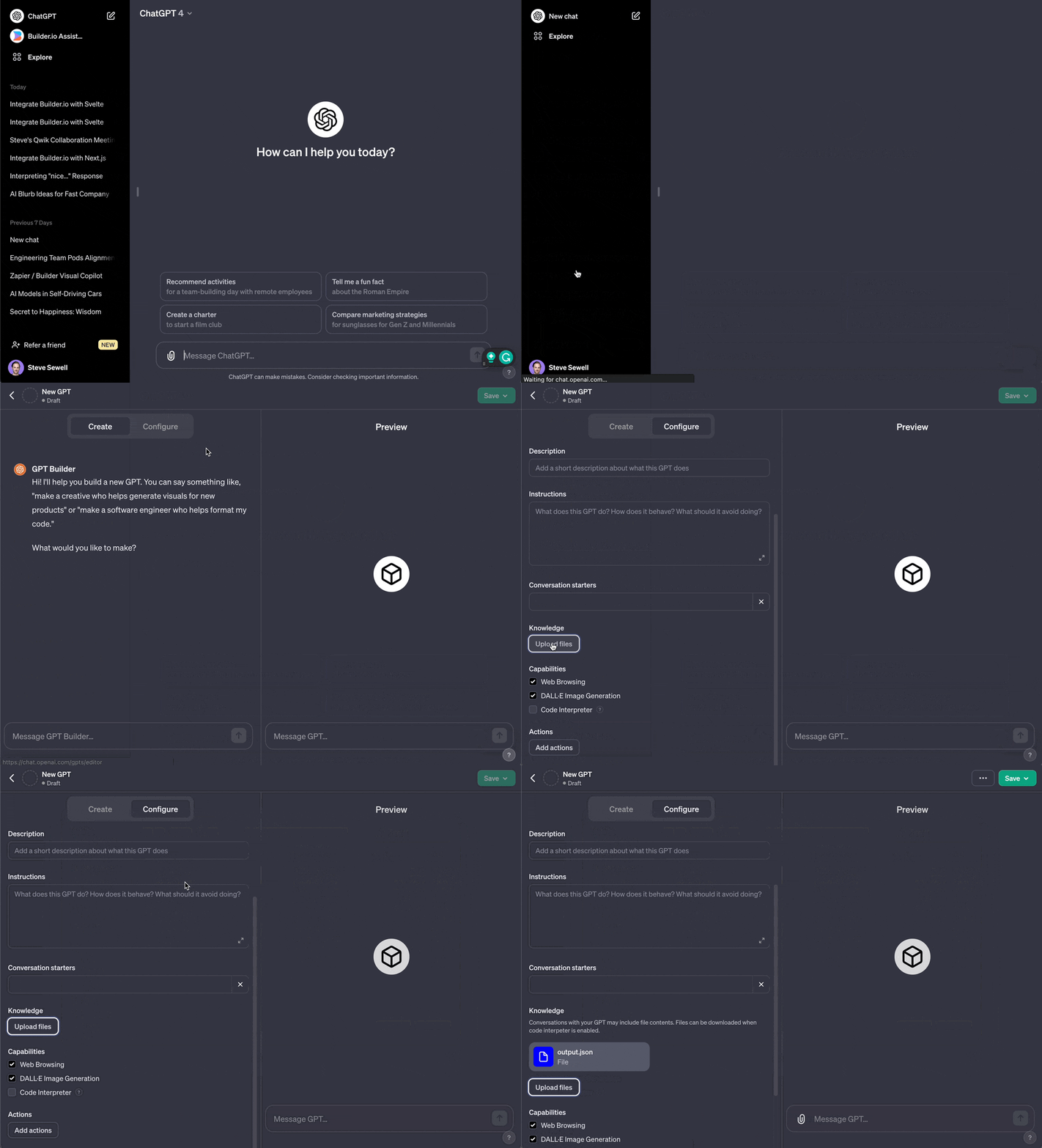
1. Go to [https://chat.openai.com/](https://chat.openai.com/)
2. Click your name in the bottom left corner
3. Choose "My GPTs" in the menu
4. Choose "Create a GPT"
5. Choose "Configure"
6. Under "Knowledge" choose "Upload a file" and upload the file you generated
#### Create a custom assistant
Use this option for API access to your generated knowledge that you can integrate into your product.
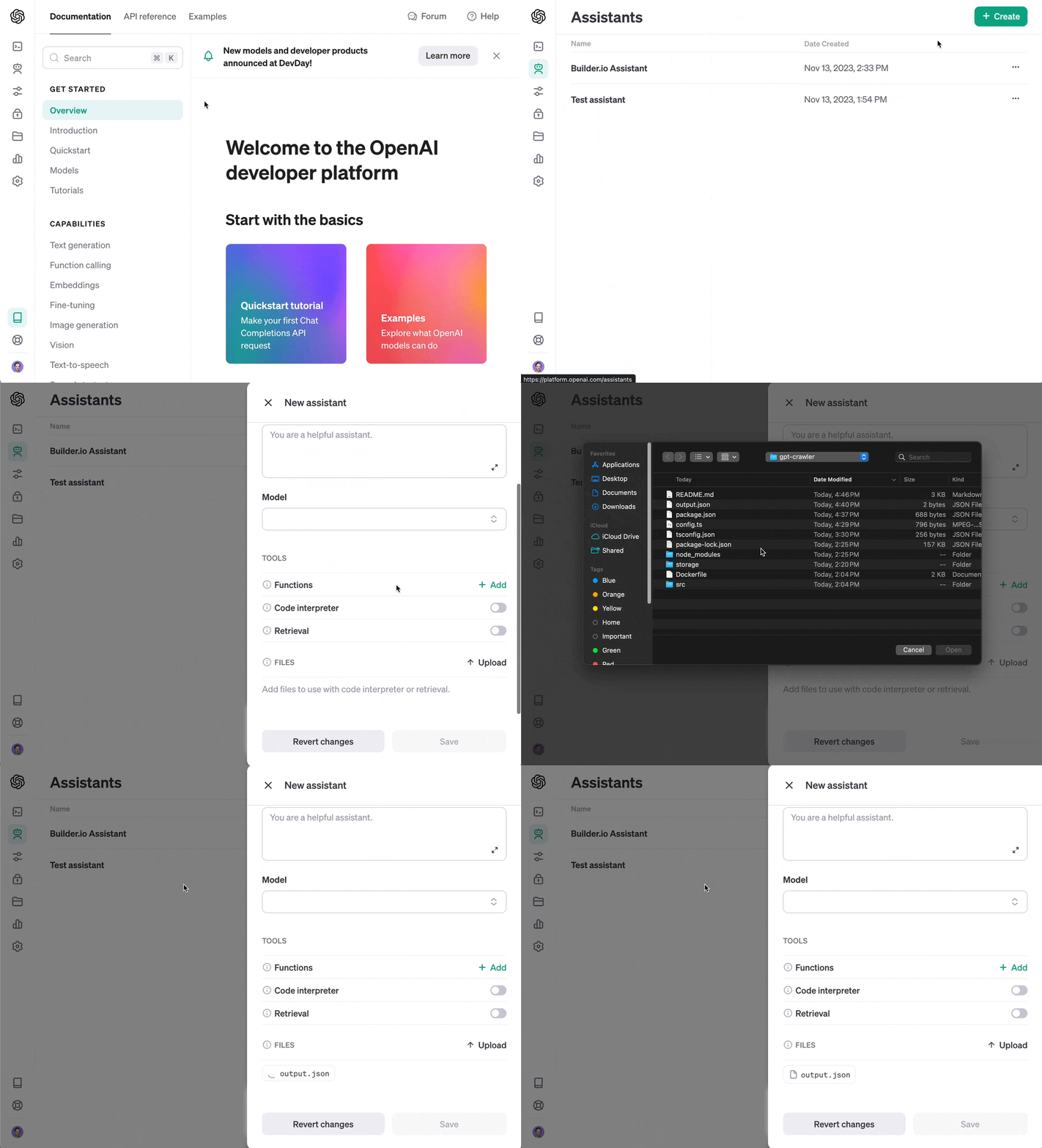
1. Go to [https://platform.openai.com/assistants](https://platform.openai.com/assistants)
2. Click "+ Create"
3. Choose "upload" and upload the file you generated
## Contributing
Know how to make this project better? Send a PR!